Overview
Open-source Lovelace dashboard cards for the Whisker and Litter-Robot integration in Home Assistant, giving pet owners clear visibility into litter status, cycles, and device health without leaving their smart-home UI. Built with TypeScript for the frontend stack, distributed via HACS, and maintained under the homeassistant-extras GitHub organization for easy install and updates.
README
Whisker Card
Litter-Robot status and controls in a single Lovelace card

Overview
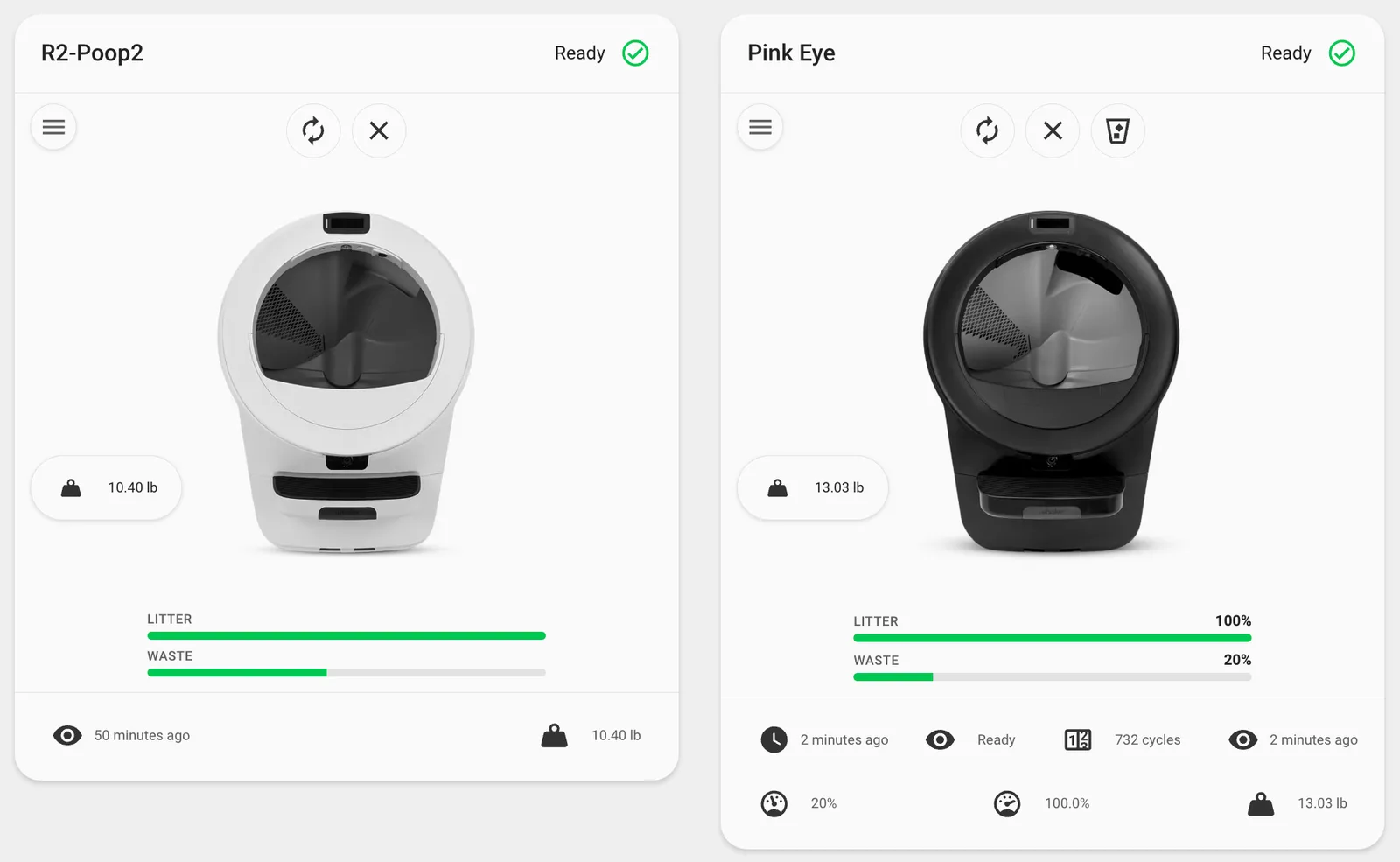
Whisker Card is a custom Lovelace card for Home Assistant that shows your Litter-Robot at a glance. It uses the official Litter-Robot integration (litterrobot).

Requirements
- Home Assistant with the Litter-Robot integration configured and at least one robot device present.
- The card is configured with a
device_id(pick the robot in the visual editor, or paste the id from Settings → Devices & services → Litter-Robot → device).
Compatibility and testing
The card has been developed and tested with a Litter-Robot 5 Prop (LR5). Other models (for example LR3 or LR4) may work as long as the core integration exposes the same kinds of entities and translation keys; behavior can differ slightly (for example how reset is exposed). If something does not show up or act correctly on your model, open an issue so we can track it—include your HA version, integration version, and robot model when you can.
Features
- Status header — Friendly title (device name or optional override), human-readable status text, and a colored status icon derived from the
status_codesensor. - Cycle styling — While the robot reports an active cycle (
ccp,ec,cst), the card reflects cycling state for subtle visual emphasis. - Quick actions — Picture-style controls for the litter box vacuum and reset (see Interactions below).
- Controls menu — A menu button opens a dialog with standard Lovelace entity rows for globe light, globe brightness, panel brightness, and cycle delay when those entities exist.
- Pet weight — A compact chip for the pet weight sensor (when present).
- Litter and waste gauges — Visual fill levels; waste styling reflects severity as the drawer fills.
- Last seen — Shown at the bottom when a last_seen entity is available.
Interactions
| Control | Tap / click | Hold (press and hold) |
|---|---|---|
| Litter box (vacuum) | Starts a clean cycle (vacuum.start) | Opens the standard Home Assistant more-info dialog for that entity |
| Reset | Presses the reset button (button.press) | Opens more-info for that entity |
The controls menu (hamburger icon) opens a dialog of full entity rows—use each row’s own tap/hold behavior as in the rest of Lovelace.

Pet weight chip and litter / waste gauges: click (or keyboard activate on the chip) opens more-info for the corresponding entity.
Configuration
Visual editor
Add the card from the dashboard editor and choose Litter Robot Device (filtered to the litterrobot integration). Optionally set Card Title to override the device name shown in the header.

YAML
Minimal configuration:
type: custom:whisker-card
device_id: YOUR_DEVICE_ID
With an optional title:
type: custom:whisker-card
device_id: YOUR_DEVICE_ID
title: Cat HQ
| Option | Type | Description |
|---|---|---|
device_id | string | Required. Home Assistant device id for the Litter-Robot. |
title | string | Optional. Overrides the card heading; defaults to the device name. |
Quick start
type: custom:whisker-card
device_id: YOUR_DEVICE_ID
Replace YOUR_DEVICE_ID with the id from the device page in Home Assistant, or use the UI editor to pick the device.
Installation
HACS (recommended)
- Open HACS in Home Assistant.
- Open the menu → Custom repositories.
- Add
https://github.com/homeassistant-extras/whiskerand category Dashboard. - Install Whisker Card (or the name shown for this repository) and restart if prompted.
- Add the Lovelace resource if HACS does not do it automatically (see manual steps below for the exact URL pattern).
Manual installation
- Download
whisker.jsfrom thedistfolder attached to the latest release (the build artifact isdist/whisker.js). - Copy it to
www/community/whisker/(create the folder if needed). - Register the module under Settings → Dashboards → Resources (or in
configuration.yaml):
lovelace:
resources:
- url: /local/community/whisker/whisker.js
type: module
Development
Clone the repository, install dependencies with yarn, then yarn build produces dist/whisker.js. Unit tests use Mocha: run yarn test.
Project Roadmap
- Litter-Robot device discovery via
translation_keymapping - Visual card — status, gauges, pet weight, last seen
- Tap / hold actions on status icons (cycle / reset vs more-info)
- Controls dialog with native entity rows
- Lovelace card editor (device selector + title)
- Automated tests (Mocha)
Contributing
- Join the Discussions — Share feedback or ask questions.
- Report Issues — Bugs, model-specific gaps, or feature requests (issue templates).
- Submit Pull Requests — See contributing guidelines when available.
- Discord — Extra help or chat.
- More homeassistant-extras projects
License
This project is licensed under the MIT License. See the LICENSE file.
Acknowledgments
- Built with Lit.
- Status mapping aligns with Home Assistant’s
litterrobotstatus_code sensor options. - Thanks to all contributors!