Z-Wave card set (Zooz)
Open Source

Z-Wave card set (Zooz)

2025·Open Source / Community

Overview

A coordinated set of custom Lovelace cards for Zooz and compatible Z-Wave devices so switches, sensors, and energy reporting look and behave consistently across the dashboard. Reduces one-off YAML and copy-paste card configs by packaging opinionated layouts for Z-Wave JS users. TypeScript implementation with HACS delivery and CI for reliable releases.

README

<p align="center"> <img src="assets/z-wave.png" align="center" width="50%"> </p> <p align="center"><h1 align="center">Z-Wave Card Set</h1></p> <p align="center"> <em>Boosting your Z-Wave integration.</em> </p>

Home Assistant hacs_badge

GitHub Release GitHub Pre-Release GitHub Tag GitHub branch status

stars home commits license

<p align="center">Built with the tools and technologies:</p> <p align="center"> <img src="https://img.shields.io/badge/npm-CB3837.svg?style=for-the-badge&logo=npm&logoColor=white" alt="npm"> <img src="https://img.shields.io/badge/Prettier-F7B93E.svg?style=for-the-badge&logo=Prettier&logoColor=black" alt="Prettier"> <img src="https://img.shields.io/badge/TypeScript-3178C6.svg?style=for-the-badge&logo=TypeScript&logoColor=white" alt="TypeScript"> <img src="https://img.shields.io/badge/GitHub%20Actions-2088FF.svg?style=for-the-badge&logo=GitHub-Actions&logoColor=white" alt="GitHub%20Actions"> <img src="https://img.shields.io/badge/Lit-324FFF.svg?style=for-the-badge&logo=Lit&logoColor=white" alt="Lit"> </p> <br>

Overview

This project brings a set of cards to display info about your Z-Wave devices. Many of these are great if you have a dedicated status view for your network or connected devices.

Cards

Z-Wave Device Info

Universal card for all Z-Wave devices showing detailed device information and controls.

card

Device Center

See all your devices and their states and some controls if applicable in one place.

card

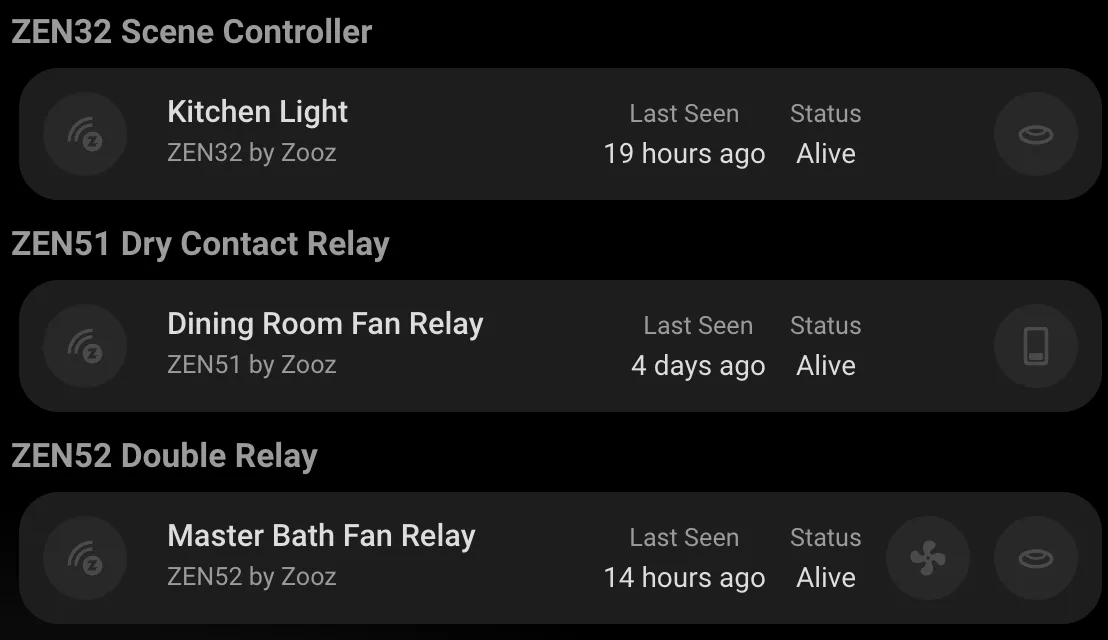
Z-Wave Nodes Status Card

Shows status and last seen time of all your nodes.

card

Hub Card

Shows info about the Z-Wave Hub.

card

Installation

HACS (Recommended)

HACS

  1. Open HACS in your Home Assistant instance
  2. Click the menu icon in the top right and select "Custom repositories"
  3. Add this repository URL and select "Dashboard" as the category
    • https://github.com/homeassistant-extras/zwave-card-set
  4. Click "Install"

Manual Installation

  1. Download the zwave-card-set.js file from the latest release in the Releases tab.
  2. Copy it to your www/community/zwave-card-set/ folder
  3. Add the following to your configuration.yaml (or add as a resource in dashboards menu)
lovelace:
  resources:
    - url: /local/community/zwave-card-set/zwave-card-set.js
      type: module

Add the cards to your dashboard using the UI editor or YAML.

Configuration Options

See the README files of the individual cards for configuration and detailed information.

Some cards may require the hub to be labeled with a "Hub" label:

hub

Supported Devices

All Z-Wave devices are supported through the universal Device Info card. I have tested mainly Zooz devices as this is my Z-Wave devices of choice. Let me know if you have any issues and we'll get them fixed!

Project Roadmap

  • Initial design: create initial room card based on button-card template in UI minimialist theme.
  • Editors: make sure stub configs and previews are solid.
  • Node cards: show info about different nodes.
  • Node status card sizing: make sizing dynamic, can't figure it out.
  • Device Center: add docs and pics towards end.
  • Themes: test default theme, etc.
  • Node Info bugs: fix title, firmware, etc. - thanks @minchinweb
  • Custom tap actions: can ping nodes on the status card and custom actions - thanks @pjschaffer
  • Node status filtering: add filters to show/hide dead, active, and sleeping nodes - thanks @dimatx

Contributing

<details closed> <summary>Contributing Guidelines</summary>
  1. Fork the Repository: Start by forking the project repository to your github account.
  2. Clone Locally: Clone the forked repository to your local machine using a git client.
    git clone https://github.com/homeassistant-extras/zwave-card-set
    
  3. Create a New Branch: Always work on a new branch, giving it a descriptive name.
    git checkout -b new-feature-x
    
  4. Make Your Changes: Develop and test your changes locally.
  5. Commit Your Changes: Commit with a clear message describing your updates.
    git commit -m 'Implemented new feature x.'
    
  6. Push to github: Push the changes to your forked repository.
    git push origin new-feature-x
    
  7. Submit a Pull Request: Create a PR against the original project repository. Clearly describe the changes and their motivations.
  8. Review: Once your PR is reviewed and approved, it will be merged into the main branch. Congratulations on your contribution!
</details>

License

This project is protected under the MIT License. For more details, refer to the LICENSE file.

Acknowledgments

  • Built using LitElement
  • Inspired by Home Assistant's chip design
  • Button-Card was a huge inspo
  • Thanks to all contributors!

contributors

ko-fi

Code Quality

Forgive me and my badges..

Stats

Bugs Vulnerabilities Code Smells Technical Debt Duplicated Lines (%) Lines of Code Coverage

Ratings

Quality Gate Status Reliability Rating Security Rating Maintainability Rating

Build Status

Main

CodeQL Dependabot Updates Main Branch CI Fast Forward Check

Release

Release & Deploy Merge

Other

Issue assignment Manual Release