Web Canvas
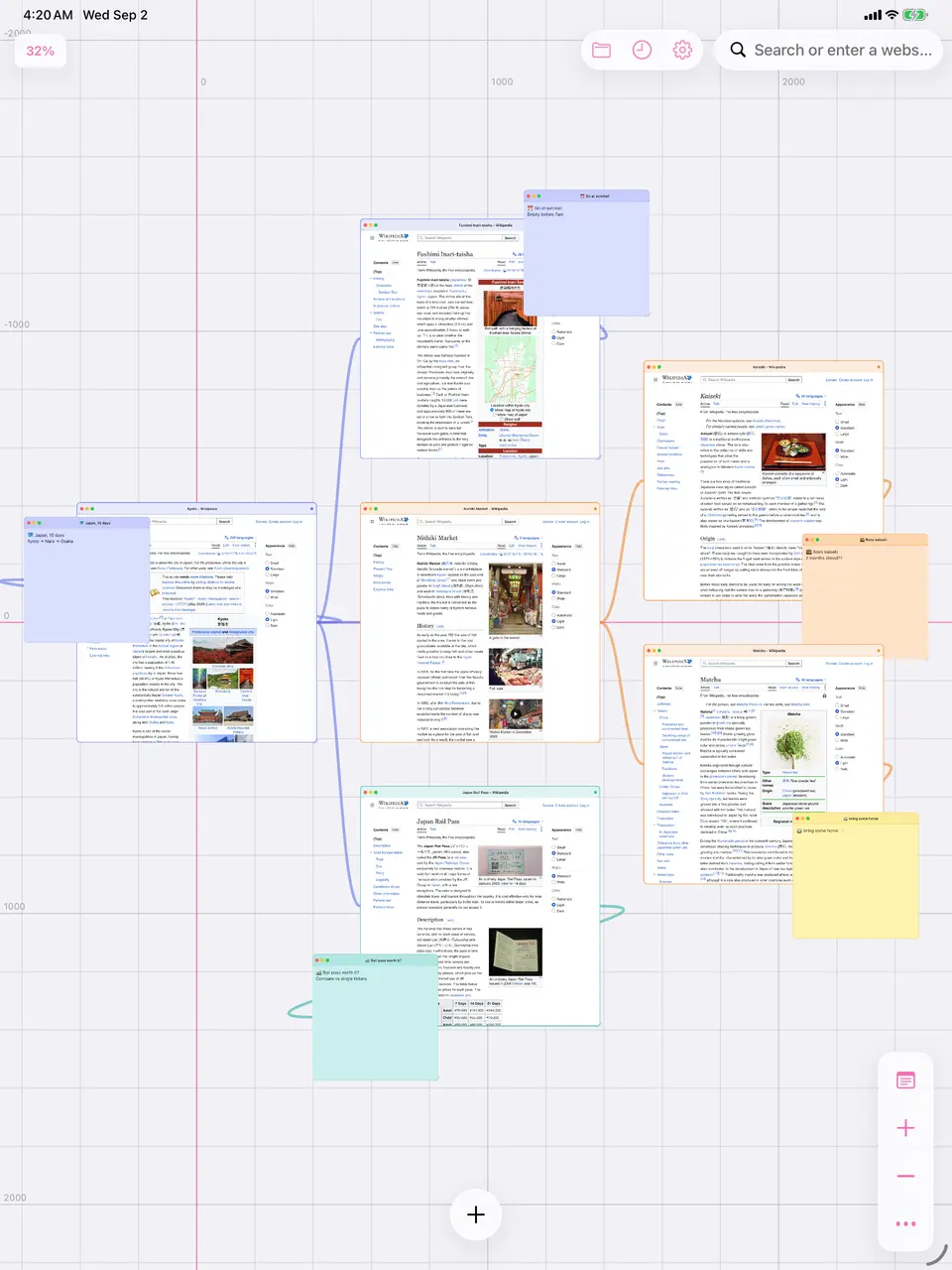
A browser built on an infinite canvas instead of tabs. Pages, images and notes sit side by side, connected by lines, and the whole arrangement saves.
- For
- Our own app
- When
- 2025–2026
- Status
- Live on the App Store and Google Play.


The situation
Tabs fall apart on research. They’re a row of identical icons with no memory of how the pages relate, so a subject you spent an afternoon on is unreadable the next morning.
What I built, and why
A browser on an infinite canvas. Live web pages, images and sticky notes share one surface, connected by lines and grouped by color, and the whole arrangement saves and reloads. It runs on iPhone, iPad and Android from one codebase.
Why I did it this way
Reanimated for the viewport, Skia for the ink
Pan and zoom run on the UI thread, so a gesture never waits on JavaScript and the canvas holds 60fps with a dozen live web pages on it. Skia draws the parts that are drawings: the connection lines, the grid, and the thumbnails in the sessions list.
Analytics that can’t see a URL
Event names are a fixed list and each event’s fields are typed, so no call site can invent a field. The rule the code enforces is that no full URL, search or note text ever reaches the analytics provider.
Everything stays on the device
Sessions, history and settings live on the device. Sharing a session produces a link that points at a canvas already on that device, so nothing is ever uploaded. The cost is no sync between devices, which is the most common request we get.
Screenshots from seeded canvases
Store screenshots are captured by Maestro against named canvases built through a dev-only link, so a shot is the same every run instead of hand-arranged. It also turned up a measurement that changed the plan: note text is about 4pt once a full canvas is zoomed to fit, so one screenshot can’t show both the whole canvas and readable notes.
Color that flows down a connection tree
A color set on an item is inherited by everything connected below it unless a child overrides it. That’s what lets a line of research read as one group when you’re zoomed out too far to read any text.
What changed
Web Canvas is live on the App Store and Google Play. Sticky notes, connections and color all came from requests in the in-app support chat, which is a decent argument for keeping support chat in a free app.
Built with
- React Native
- Expo
- TypeScript
- Reanimated
- React Native Skia
- Zustand
- NativeWind
- PostHog
- Maestro